Server
STAR RP
Store
Technical support
Legal information
Technical support
Errors - ERROR, MISSING_TEXTURE, Missing Map
1
Check that all content for the server you play on is installed
2
Reinstall / Install
CS:S content
3
Enter this command in the console: mat_specular 1
server content
If none of the above helped
1
We recommend unsubscribing from all third-party addons (those not included in our content).
2
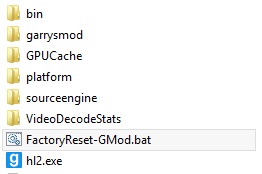
If that does not help, open the game folder (C:\Program Files (x86)\Steam\steamapps\common\GarrysMod) and run FactoryReset-GMod.bat
server content
STAR RP
How to install CS:S content
1
Download the CS:S content using
this link
2
Extract the files from the archive to: C:\Program Files (x86)\Steam\steamapps\common\GarrysMod\garrysmod\addons\css_content
3
Launch the game and check